Application Masters System
Centralized configuration and management of application master data.

Application Masters System
EduSys Application Master feature allows to configure all one time configurations in the application as per the Institutions Requirements that includes application settings,Academic Settings, Notification Settings, Departments settings building settings Etc are This features helps in choosing the options related to the Institutions with respect to the requirements. Based on the selection of the option, information will be reflected in the respective screens in EduSys Software.
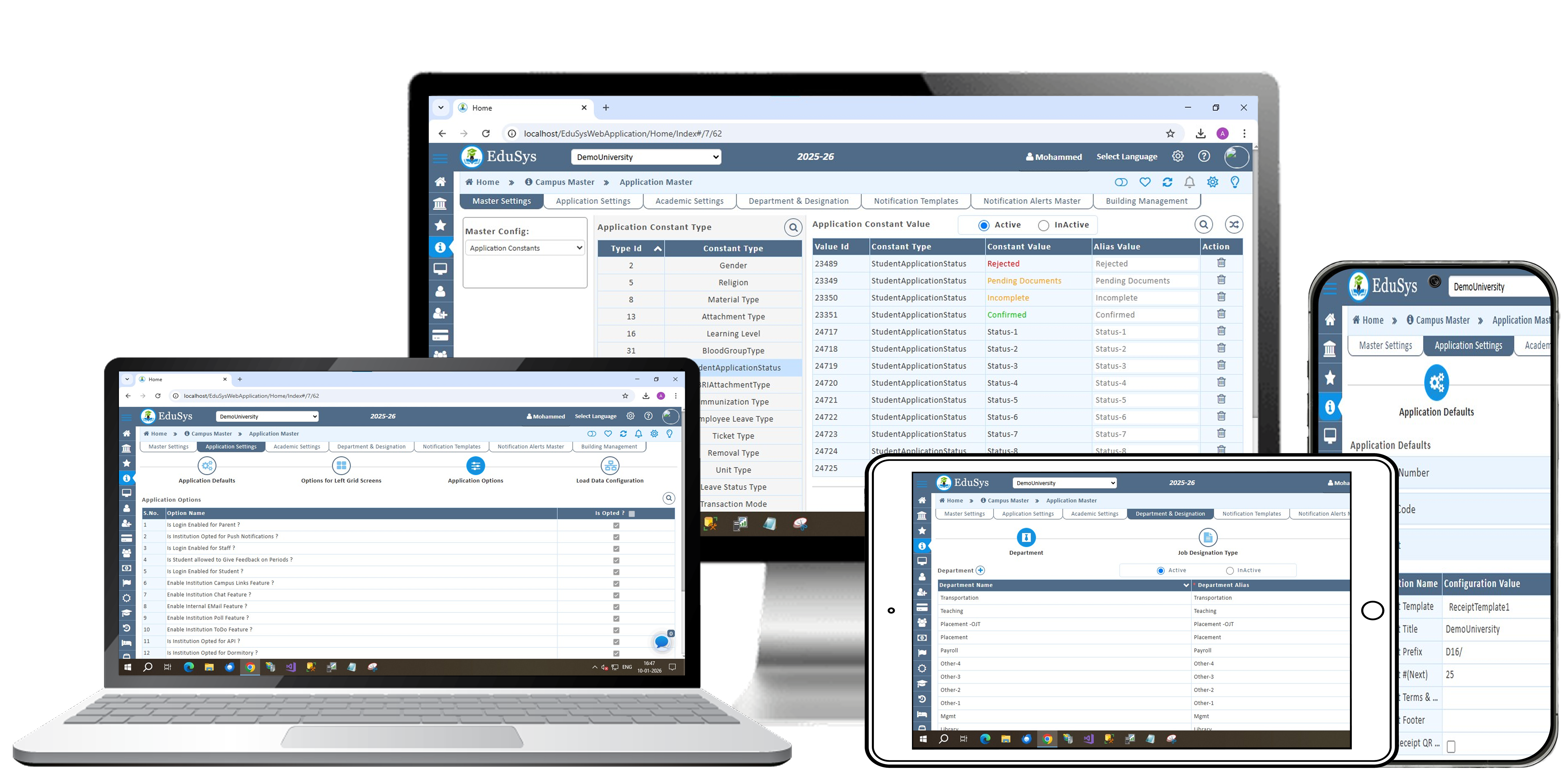
Application Masters System Features
Master Settings & Application Settings
The Master Settings screen enables one-time configuration of core institutional features. It allows adding admission documents, defining staff assignment types, customizing behaviour and course year names, and setting daily diary emails with absence alerts for parents. Administrators can also configure letter formats, manage branch and faculty ratings, and specify occupation and qualification details in family records.
The Screen Defaults module enables institutions to configure display fields in the Left Grid for key screens such as admissions, registrations, and staff details. Administrators can set column preferences, edit or reset options, and manage core settings like landing pages, roll/admission numbers, student feedback, fee templates, and receipt details. SMTP configuration ensures smooth external email communication. While primarily a one-time setup, all settings can be modified as needed to align with institutional requirements.
Academic Settings & Department & Designation
The Elective Configuration Screen allows management to create and manage elective subjects for each batch by adding name, code, and optional deadlines. Students can view and select these electives through their login in the Elective Enrollment Screen. Management can edit existing entries or clear unsaved data as needed.
The Department & Designation Screen enables management to add and manage departments, designations, and their mappings. Departments and designations can be created using alias fields and then linked through the Mapping option, which reflects in the Staff Registration Screen for assigning staff roles. The screen also provides filter, edit, delete, and clear options for efficient data management.
Notification Templates & Notification Alerts Master & Building Management
The Notification Templates Screen enables management to design, customize, and manage notification formats. Templates are created by defining a name, adding content with tags, and saving them for use. These templates appear in the Notification Alerts Master for access control and are applied in both manual and automated notifications. They can be updated anytime as needed.
The Notification Alerts Master lets management control user access to automatic notifications by enabling or disabling specific types and linking templates configured in the Notification Templates Screen. Users receive alerts only for the notification types approved by management.
The Building Management Module enables institutions to define and manage buildings, floors, and rooms, ensuring efficient allocation, maintenance, and utilization of infrastructure resources.
Load Data & ID Card & Event Gallery
The Load Data Module enables bulk uploading of school records—such as attendance, library, dorm, staff, student, vehicle, and biometric data—through Excel templates. Users can upload, process, and track results via detailed load reports showing totals, successes, failures, and graphical summaries.
The ID Card Module enables institutions to design customized ID cards with configurable layouts, backgrounds, themes, and front colours. It also provides a Smart ID Card List to efficiently manage and track all issued cards for students and staff.
The New Event Module allows institutions to create and manage events by specifying the event name and description. The system displays all event records and provides action options for editing or managing them.
Guest View & Guest View Social Media (GVI)
The Guest View Interface (GVI) in EduSys provides institutions with a customizable website to display school information, gallery images, admission updates, and more. Management can modify tabs, icons, content, and backgrounds, as well as add or delete information as needed. GVI ensures flexibility, allowing schools to decide what to project on their website and update it anytime.
The Guest View Social Media (GVI) in EduSys allows schools to manage up to six social media links directly from their website interface. Management can update links, upload brochures, post school news, and switch between five available themes anytime. This feature centralizes all social media and news updates on a single page, offering unlimited flexibility to modify and maintain content.
Certificate Management & Certificate Approval
The Certificate Theme Module enables institutions to create and manage certificates with customizable themes, templates, types, attributes, attachments, and margins, ensuring professional and tailored certificate design.
The Certificates Approval Screen enables institutions to filter and manage student certificate requests by date, role, degree code, course year, and status. It displays all request details with options to review and take action.
Frequently Asked Questions
What is Application Master?
The Application Master is a centralized module that streamlines institutional management by handling all core administrative and academic settings. It includes Master Settings for admissions, staff assignments, behaviour and course customization, letters, ratings, and family records; Application Settings for screen layouts, roll/admission numbers, fee templates, and SMTP; Academic Settings for elective creation and student selection; Department & Designation for staff role management and mappings; Notification Templates & Alerts for automated and manual communications; and Building Management for managing buildings, floors, and rooms. This integrated module ensures efficient operations, accurate record-keeping, and easy control over all institutional processes.
What are the benefits of Application Master?
The features of Application Master are:
- Centralized management of all core administrative and academic settings.
- Streamlined operations for admissions, staff assignments, electives, and certificate handling.
- Customizable settings for behaviour, course years, screen layouts, and notifications.
- Efficient staff and role management through departments and designations mapping.
- Automated communication via configurable notification templates and alerts.
- Improved academic management with elective creation and student selection.
- Infrastructure oversight through building management for efficient allocation and maintenance.
- Accurate and consistent record-keeping across departments and functions.
- Flexible and updatable settings to align with evolving institutional needs.
- Enhanced decision-making with consolidated data and streamlined processes.
What is Campus Configuration?
The Campus Configuration module in EduSys efficiently manages campus operations and the school’s digital presence. It includes Load Data for bulk uploading attendance, dorm, library, staff, student, vehicle, and biometric records with detailed reports. Guest View (GVI) provides a customizable website with editable tabs, gallery, and real-time admission updates, while GVI Social Media manages up to six social media links, news, brochures, and website themes. The ID Card Module designs and tracks ID cards with configurable layouts and a Smart ID Card List. Certificate Theme & Approval allows creating professional certificates and managing student requests, and the Event Gallery enables planning and organizing school events efficiently, ensuring streamlined operations and enhanced digital engagement.
What are the benefits of the Campus Configuration?
- Efficient bulk data management for attendance, dorm, library, staff, student, vehicle, and biometric records with detailed reports.
- Customizable school website via Guest View (GVI) with editable tabs, gallery, and real-time admission updates.
- Centralized social media management for up to six links, news posts, brochures, and theme customization.
- Streamlined ID card management with configurable layouts, backgrounds, themes, and Smart ID Card List.
- Professional certificate management with templates, attributes, margins, attachments, and approval workflows.
- Organized event planning and management through the Event Gallery module.
- Integrated workflow combining academic, administrative, and digital operations.
- Enhanced communication and engagement with parents, students, and stakeholders.
- Flexible and unlimited editing of content, templates, and digital resources.
- Time and resource efficiency, reducing manual effort and improving productivity.
What is the price of Application Master?
It will be based on Institution's student strength and please contact our sales for more information.
EduSys Pricing8.7/10 Rating on Google Business | 13 Reviews
Useful Links
Social media









Copyright © 2026. All Rights Reserved. | Developed by 